
Session Levels Indicator for NinjaTrader 8
NSL Dynamic Session Levels
10 key levels plotted automatically. Audio alerts on every cross.
Day session, night session, and open range — all in one indicator.
Prior OHLC, current session extremes, overnight highs and lows, and configurable open range levels — updated in real time, labeled on chart, with per-level toggle and alert controls.
Fully functional trial — no credit card required — instant download
✔ One-Time Purchase ✔ Instant Download ✔ NT8 Compatible ✔ Direct Developer Support
Already decided?
Full license · All updates included · 30-day money-back guarantee

10
Auto-Plotted Levels
3
Session Types
8
Per-Level Alerts
2
Toolbar Toggle Buttons
Trading Without Session Context
- Price rejects at the prior day high — you miss it because you’re watching a moving average
- Open range forms, breakout triggers — you don’t know where the range boundary is
- Overnight session sets extremes that act as magnets all day — invisible on your chart
- Manually drawing these levels every morning wastes time and introduces errors
NSL Dynamic Session Levels plots all 10 levels automatically — with alerts when price reaches each one.
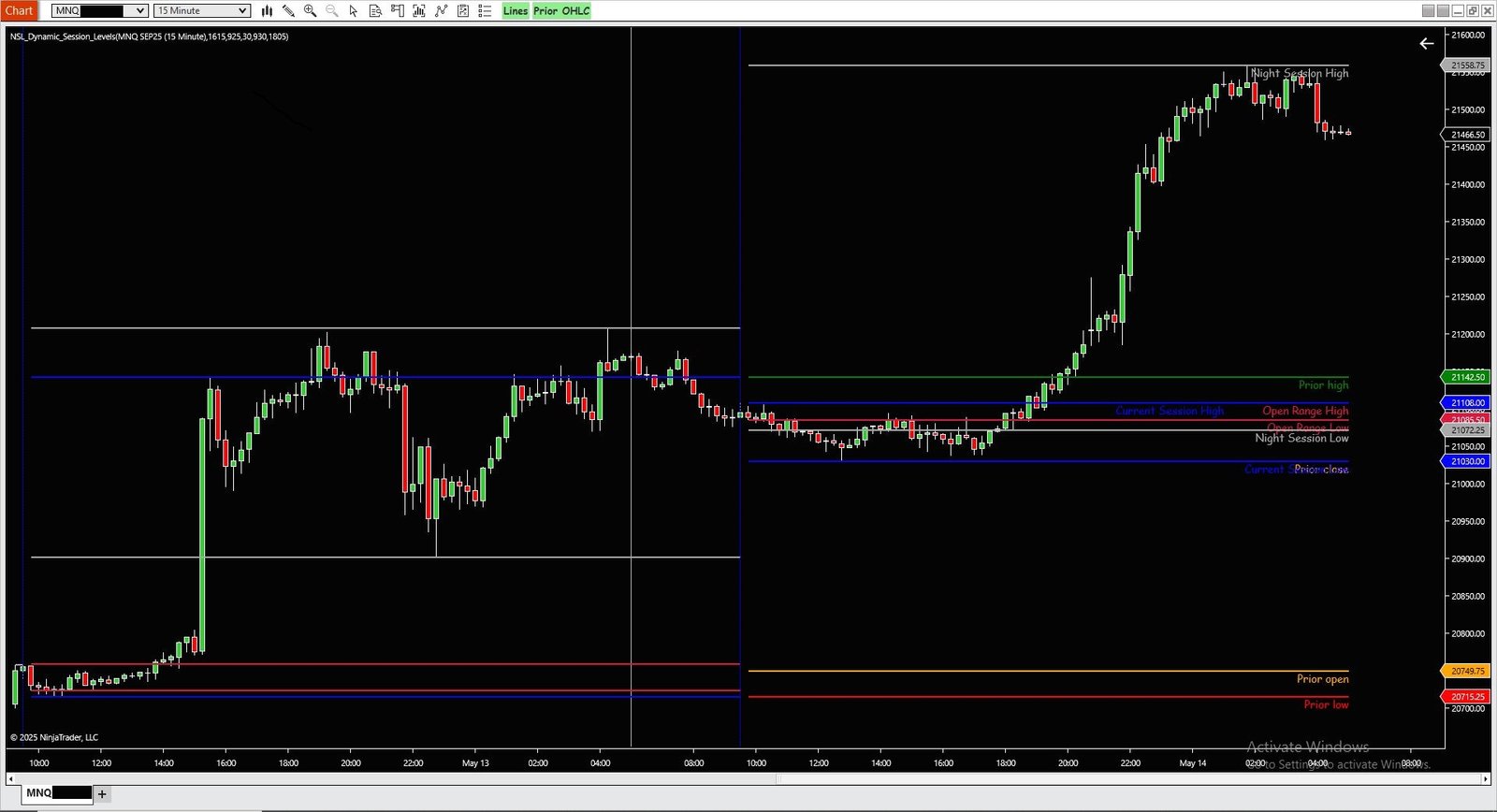
What Gets Plotted
Three Session Groups — Ten Levels
Each level is individually configurable: color, width, dash style, active toggle, and audio alert.
Previous Session
Prior Day OHLC
Carries over the prior day’s Open, High, Low, and Close from the previous trading session. Stored at session rollover and plotted across the new day. A separate toolbar button lets you toggle all four OHLC lines on/off without removing the indicator.
- Prior Open — Orange by default
- Prior High — Green by default
- Prior Low — Red by default
- Prior Close — Orange by default
Live Session Tracking
Current & Night Session
Current session high and low update in real time as new extremes print. Night session high and low track the overnight window (default 18:05–09:25) separately — both displayed simultaneously so you can see where overnight activity set boundaries relative to today’s range.
- Current Session High/Low — Blue by default
- Night Session High/Low — DarkGray by default
Breakout Reference
Open Range High & Low
Calculates the high and low of the opening range period (default: first 30 minutes from session open at 09:30). The range is computed by scanning all bars from session open to the period end — then plotted for the rest of the day as breakout reference levels.
- Open Range High — Crimson by default
- Open Range Low — Crimson by default
- Period — Configurable in minutes
Under the Hood
How the Levels Are Calculated
Every level is derived from NinjaTrader’s session data — no approximations, no static times.
SessionIterator for Accurate Day Detection
Uses NinjaTrader’s built-in SessionIterator to determine the trading day boundary — not a fixed midnight cutoff. When a new trading day is detected, prior session values are stored and the new session starts fresh. A vertical line is drawn at the exact session open bar.
Open Range Calculated Bar-by-Bar
When the open range period expires (start time + period minutes), the indicator scans backwards through all bars from the period end to session open — taking the true high and low across the full range window, not just a single bar. Plotted for the remainder of the session.
Real-Time Level Updates (iscschange / isnschange)
Current session and night session levels use change flags to trigger retroactive updates. When a new extreme prints, the indicator repaints all visible bars from session open to current bar — so the level line extends correctly across the full session without requiring a bar close.
Toolbar Toggle Buttons (WPF Injected)
Two buttons inject directly into the chart’s main menu bar via WPF: “Lines” toggles all 10 plots on/off; “Prior OHLC” toggles just the four prior-day levels. Both buttons show green when active, gray when off. Toggling calls ChartControl.InvalidateVisual() for instant redraw.
Alerts
Audio Alert on Every Level Cross
Each of the 8 alertable levels uses CrossAbove/CrossBelow detection — fires only on the actual cross bar, not on every tick at the level.
Previous Session
Prior Open · Prior High · Prior Low · Prior Close
Open Range
Open Range High · Open Range Low
Night Session
Night Session High · Night Session Low
Per-Level Controls
Each level has its own: Active toggle · Alert toggle · Sound file · Color · Width · DashStyle
Comparison
How It Stacks Up
FAQ
Common Questions
What chart types does this work on?
Any intraday chart — minute, tick, volume, or range bars. The indicator requires intraday data with at least one full day of history to calculate prior session values. It will not run on daily or weekly bar types.
Can I change the open range period?
Yes. The open range period is a configurable parameter (default: 30 minutes). Set it to any value — 15, 30, 60 minutes — and the high/low calculation adjusts accordingly from the session open time.
Can I turn off individual levels I don’t need?
Yes. Each of the 10 levels has its own Active toggle in the indicator properties. Disabling a level sets its plot color to transparent — the line disappears from the chart without affecting any other level.
How do the toolbar buttons work?
Two buttons appear in the chart menu bar when the indicator loads: “Lines” toggles all 10 plots on/off; “Prior OHLC” toggles just the four prior-day levels. Both show green when active and gray when off. Changes take effect instantly without reopening the indicator properties.
What triggers the audio alerts?
Alerts fire on CrossAbove or CrossBelow — price must actually cross the level on the current bar. The alert plays only once per cross. Each level uses a separate sound file, configurable per level in the properties.
Is there a refund policy?
30-day money-back guarantee. If it doesn’t work for your setup or trading style, contact us within 30 days for a full refund — no questions asked.
Try It First
Download the 7-Day Free Trial
All 10 levels. All alerts. Both toolbar buttons. No credit card required. Test it on your charts — then decide.
Fully functional trial | No credit card required | Instant download
✔ One-Time Purchase ✔ Instant Download ✔ NT8 Compatible ✔ Direct Developer Support
Tried it and ready to get the full license?
Full license · All updates included · 30-day money-back guarantee